


 Watch video







 Sign in with Google
Tag Management
Tag Management – #1 YouTube Tag Generator & Tag Optimization Tool
Find proven tags faster using the most advanced YouTube tag generator with accurate YouTube tag suggestions, competitor insights, and time-saving tag organization tools.
Find and Save Proven Tags for Future Videos
Researching tags to categorize and optimize your videos is essential for every creator but it’s hard to find the time to do it right with everything else on your plate.
TubeBuddy Tag Management shortcuts your YouTube tags research by showing you exactly which competitor YouTube tags are helping others get discovered by the YouTube algorithm and rank higher in search.
With just a few clicks, you can copy their best-performing tags and apply them to your latest uploads so your content resonates with your audience and performs better in search.


Create New Videos from Existing Tag Lists
Reuse your researched tags with the YouTube tag management tool to optimize new content instantly. This helps maintain consistency and improves your YouTube tags list for stronger rankings.
Just copy the tags, create a new list, and you’re done. This keeps your YouTube tags list consistent and gives every new upload a head start in rankings, views, and engagement.
Reorder Your Video Tags with Drag-and-Drop Ease
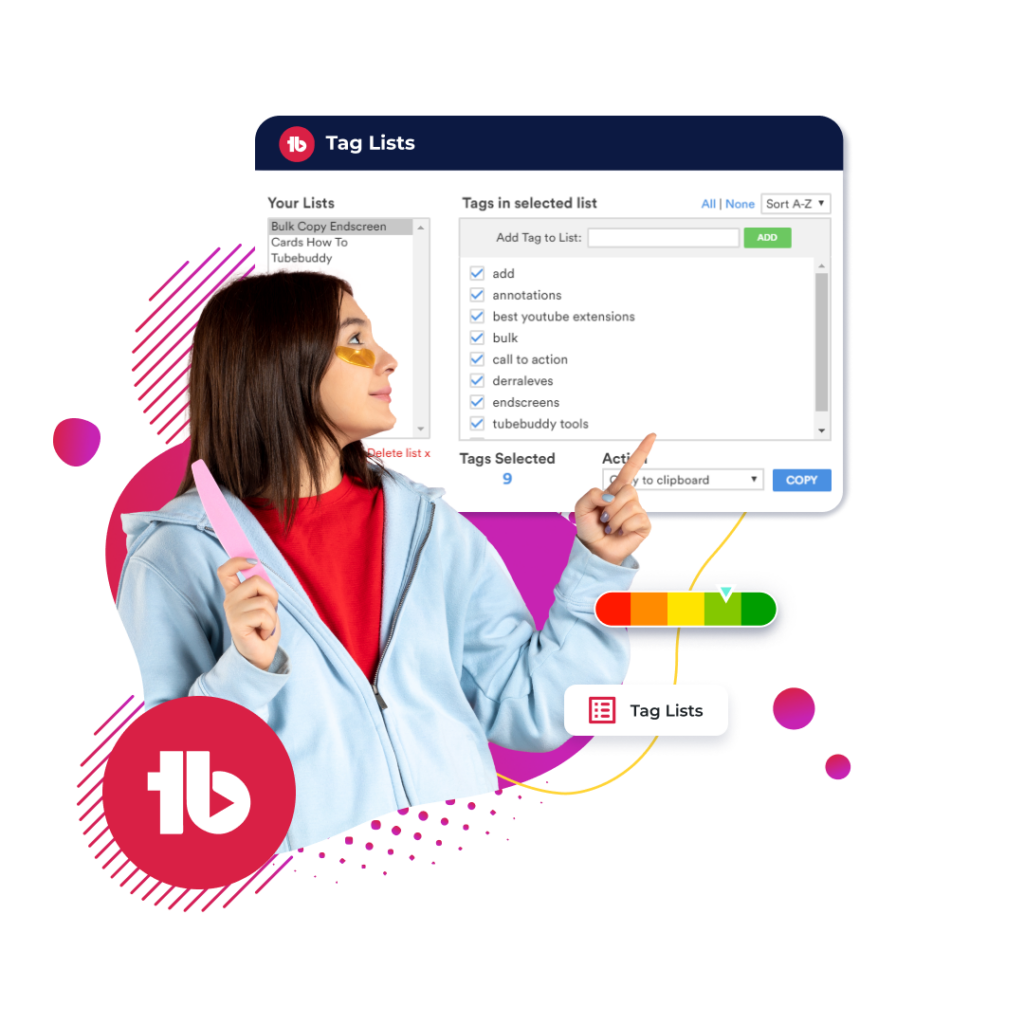
Reorder and organize your tags effortlessly. TubeBuddy restores your ability to reorder YouTube tags, clean your lists, and optimize your workflow using a simple drag and drop system.
Tag Management restores your ability to reorder YouTube tags and organize YouTube tags effortlessly. With a simple drag-and-drop interface, you can prioritize your most important keywords at the top of every list.
A cleaner tag structure = clearer signals for the algorithm.

Competitor Tag Insights
Discover the exact competitor YouTube tags that help top channels rank and get discovered. Use these insights to build a data-backed tag strategy for 2026 and stay competitive in YouTube search.
Pair competitor tag insights with Thumbnail Analyzer and A/B testing to align tags with high-CTR thumbnails and validate what truly drives performance.
Keep Your YouTube Tag Lists Organized with Tag Management
Each step provides insights to help you build a powerful YouTube tags list, reorder tags, save collections, and apply them instantly across multiple videos.
Here's how Tag Management works
Tag Management is available for the following plans

Free
Pro
Legend
Here’s How Tag Management Works
Each step helps you build a powerful YouTube tags list, speed up YouTube tags research, and organize YouTube tags at scale:
- Step 1: Open TubeBuddy's menu at the top of your YouTube Studio dashboard.
- Step 2: Click "Tag Lists" under "Extension Tools."
- Step 3: Create a list, name it, and start adding your tags.
Checkout what other creators are saying

“Once it got my videos ranking #1 in search I was hooked.”
@KarlOftebro

“TubeBuddy is VITAL for any YouTuber who is serious about making their channel a lucrative side-hustle or full-time job!”
@DanieJay

“TubeBuddy is like having a YouTube expert on staff who will give you advice and direction whenever you need it.”
@KarinCarr
Frequently asked questions
TubeBuddy’s Tag Management Tool is designed to help YouTube creators efficiently organize, find, and apply relevant YouTube tags. It centralizes your tag strategy, making it easier to manage and reuse high-performing tags across multiple videos.
TubeBuddy streamlines tag management by offering a YouTube tag generator tool that suggests top-ranking keywords. It lets creators save, sort, and apply those tags quickly, helping improve video SEO without the hassle of manual tag research.
Using this tag management tool enhances your YouTube SEO by ensuring each video has optimized, well-researched tags. This improves visibility in search results, drives more views, and makes your content easier to discover by the right audience.
To centralize tags, access the Tag Lists feature inside TubeBuddy. You can create customized lists based on video topics or niches, helping you apply consistent, relevant YouTube tags across all your content.
TubeBuddy’s Tag Management Tool includes a powerful tag generator, drag-and-drop tag reordering, tag saving and organization, and performance tracking. These features help optimize videos for visibility and long-term growth.
You can easily reorder your tags with TubeBuddy’s drag-and-drop interface. This lets you highlight the most important or trending tags by placing them at the top, which can positively impact how YouTube ranks your video.
Yes, by applying the right YouTube tags through TubeBuddy, your videos are more likely to appear in search results and recommendations. Improved tagging helps YouTube understand your content better, leading to higher rankings.
It’s very beginner-friendly. Even if you’re new to YouTube SEO, the tool walks you through organizing tags, finding suggestions, and applying them in a few simple steps, making it easy to improve your videos right away.
To get started, install TubeBuddy and head to your YouTube Studio. From there, open the Tag Lists tool, create lists based on your video topics, and begin saving and applying tags using the suggestions provided.
Many creators have seen their videos rank higher and gain more traffic by using TubeBuddy’s tag features. With optimized tags, their content became easier to find, leading to more views, better engagement, and channel growth.
Yes, TubeBuddy provides real-time tag suggestions using its built-in YouTube tag generator. These suggestions are based on search trends and top-performing videos, helping you choose tags that boost discoverability.
TubeBuddy lets you analyze how your tags contribute to video performance. You can monitor which tags drive traffic and refine your tagging strategy accordingly to maintain or improve your search visibility.
Yes, the tool works with all types of YouTube channels, from vlogging to gaming to education. Whether you’re a beginner or a pro, it adapts to your content needs and helps you manage tags effectively.
What sets TubeBuddy apart is its deep integration with YouTube, ease of use, and powerful tag generator backed by performance insights. It combines convenience and intelligence, making it more than just a basic tag organizer.
Yes. By streamlining YouTube tags research and improving relevance, your videos rank for more targeted searches.
Combine suggested tags with niche-specific keywords and apply them consistently across related content.
Yes. You can discover and reuse proven competitor YouTube tags to strengthen your own ranking strategy.
Use a mix of high-volume keywords, niche-specific tags, and competitor insights to build a scalable tag strategy.
Other ways TubeBuddy can help you become a full-time content creator
These related features will take your channel to the next level
A/B Testing
Optimize your titles, descriptions, tags, and thumbnails to see which works best for your audience.
- Get the most clicks for every video you publish
- Use the AI Title Generator to create magnetic titles in seconds
- Available in legend plan only
SEO Studio
Create professional thumbnails using parts from your video all in one place.
- Edit and create your thumbnails all in one place
- Quickly make thumbnails that win clicks
- Available in all plans
Keyword Explorer
Get your videos to rank higher on more search results with advanced keyword insights.
- Identify top searches relating to your content
- Discover trending tags to get more views
- Available in all plans



