



 Watch video








 Sign in with Google
Keyword Explorer
Keyword Explorer – #1 YouTube Keyword Research Tool for Rankings & Trending Tags
Identify the best keywords using the most advanced YouTube keyword research tool, giving you high-traffic keyword ideas, trending tags, and actionable SEO insights to boost rankings in minutes.
Boost Your Video Rankings in Google & YouTube Search Results
Use Keyword Explorer to find keyword opportunities with high search volume and low competition. Discover long-tail keywords, analyze competitors, and filter results using real-time search metrics.
With TubeBuddy Keyword Explorer, you can:
- Perform in-depth YouTube keyword research
- Discover powerful keyword ideas for YouTube
- Analyze competitor keyword analysis on YouTube
- Integrate keywords into titles, tags, and descriptions
- Boost your chances of ranking in both YouTube and Google


YouTube Keyword Research: Discover What Your Audience Wants
Creating epic content is one thing aligning it with what people are actively searching for is a true growth multiplier.
Keyword Explorer is both a search optimization tool and a content ideation engine. Discover exactly what your audience is searching for, uncover content gaps, and build your strategy using real demand data.
Deliver what viewers actively want, optimize it correctly, and you’ll start showing up in recommended videos and top search results consistently.
Keyword Explorer Tool – Find Trending YouTube Tags
Find trending YouTube tags and keywords before your competitors. Get a curated list of trending search terms specific to your niche, helping your videos rank faster and reach a larger audience.
Use keyword explorer YouTube insights to:
- Discover viral search trends early
- Add high-impact tags instantly
- Rank faster across YouTube & Google
Because Keyword Explorer isn’t just about finding keywords it’s about helping your videos get found.

Competitor Keyword Comparison
Compare Keyword Explorer with tools like VidIQ and KeywordTool.io to understand competition score accuracy, long-tail keyword suggestions, niche difficulty, and trending keyword discovery.
- Competition score accuracy
- Long-tail keyword discovery
- Niche difficulty analysis
- Trending keyword detection
Use competitor keyword analysis on YouTube to understand how others rank and outrank them with better data.
How to Use TubeBuddy Keyword Explorer for YouTube Keyword Research
Here's how Keyword Explorer works
Each step delivers powerful insights including competition score, search traffic, tag suggestions, and keyword optimization guidance:
Feature available on

*Free
500 keyword searches per day
Pro
500 keyword searches per day
Legend
* Denotes limited access
How to access feature
step 1
While in YouTube Studio, select Content from the menu list.
step 2
Select the video you would like to analyze.
step 3
Select Suggested Shorts from the TubeBuddy pullout menu.
step 4
Sit back and relax as our AI goes to work identifying the most engaging part of your video.
Step 1
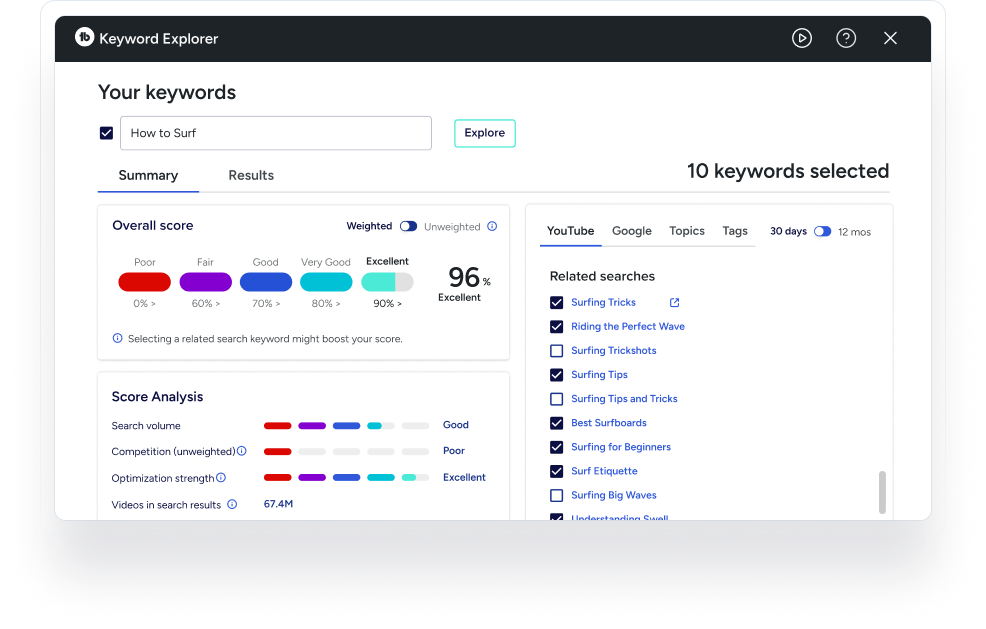
Open Keyword Explorer from the TubeBuddy drop-down dashboard
Step 2
Enter a specific keyword that you would like to receive insights on.
Step 3
Receive an overall keyword score calculated by search volume, competition, strength and other important metrics.
Step 4
Analyze related keywords and searches in order to optimize your titles, tags, and descriptions.
Checkout what other creators are saying

Karl Oftebro
“Once it got my videos ranking #1 in search I was hooked.”
@KarlOftebro

Danie Jay
“TubeBuddy is VITAL for any YouTuber who is serious about making their channel a lucrative side-hustle or full-time job!”
@DanieJay

Karin Carr
“TubeBuddy is like having a YouTube expert on staff who will give you advice and direction whenever you need it.”
@KarinCarr
Frequently asked questions
What is a YouTube keyword tool?
A YouTube keyword tool helps you find effective keywords and tags to increase video visibility, improve rankings, and drive traffic to your content.
How can a YouTube keyword tool improve video rankings?
By identifying high-traffic, low-competition keywords, it helps you optimize your title, description, and tags, improving your chances of showing up in YouTube and Google search results.
How do I conduct YouTube keyword research?
Use tools like TubeBuddy’s Keyword Explorer to input a topic, review keyword scores, analyze competition, and choose terms with high potential. Related suggestions and trend data also help refine your research.
What are the best practices for YouTube keyword research?
Target relevant, high-volume, low-competition keywords. Use long-tail terms where possible and include keywords in your title, description, and tags. Monitor trends and update keywords regularly.
What tools help with YouTube keyword search?
Popular tools include TubeBuddy’s Keyword Explorer, Google Trends, and YouTube’s autocomplete suggestions.
How do I find trending YouTube keywords?
TubeBuddy’s Keyword Explorer tracks search trends and behavior from YouTube and Google data, helping you spot emerging and high-traction keywords.
What should I look for in the best YouTube keyword research tool?
Look for features like keyword scores, trend analysis, competition data, tag suggestions, and related keyword recommendations.
What is TubeBuddy’s Keyword Explorer?
It’s a keyword research tool built into TubeBuddy that helps you discover high-performing keywords using metrics like search volume, competition, and keyword effectiveness.
What are the advantages of TubeBuddy’s Keyword Explorer?
It offers detailed keyword scoring, trend tracking, related keyword suggestions, and insights into search volume and competition to guide your video SEO.
How does TubeBuddy’s Keyword Explorer find trending keywords?
It analyzes YouTube and Google search data through the YouTube API and presents trending terms based on user behavior over 30 days and 12 months.
What type of information do I get in the Keyword Explorer?
You’ll get keyword scores, competition levels, search volume, trend data, and related keyword suggestions to support content planning.
What is the best YouTube keyword research tool?
The best tool combines real search volume, competition data, and trending YouTube tags all provided by TubeBuddy Keyword Explorer.
How does Keyword Explorer find trending YouTube keywords?
It analyzes live YouTube search behavior, keyword demand, and competition patterns in real time.
Can Keyword Explorer find long-tail YouTube keywords?
Yes. It excels at uncovering low-competition, high-intent long-tail YouTube keywords.
How does Keyword Explorer compare to VidIQ?
Keyword Explorer provides deeper tag discovery, clearer competition scoring, and direct workflow integration.
How do I get keyword ideas for YouTube videos?
Use Keyword Explorer to generate keyword ideas for YouTube based on what real users are searching for.
Other features
Look at these related features
Suggested
Shorts
Our advanced AI identifies the most engaging parts of your videos for YouTube Shorts.
- Identfy your contents best moments.
- Learn what your audience loves to see.
- Available in all plans
Thumbnail Analyzer
Analyze your video thumbnails with the power of AI to see what your audience sees and receive a predictive score for how they will perform.
- Compare potential thumbnails
- See what your audience does with our AI generated heatmap
- Available in pro and legend plans
SEO
Studio
Create professional thumbnails using parts from your video all in one place.
- Edit and create your thumbnails all in one place.
- Quickly make thumbnails that win clicks.
- Available in all plans



