



 Watch video






 Sign in with Google
Channelytics
YouTube Channel Analytics Tool – Compare Competitors & Track Growth
Compare YouTube channels instantly with the most accurate YouTube channel analytics tool. Track views, subscribers, and 30-day growth to understand what makes competitors succeed.
Discover What Sets Your Competitors Successful
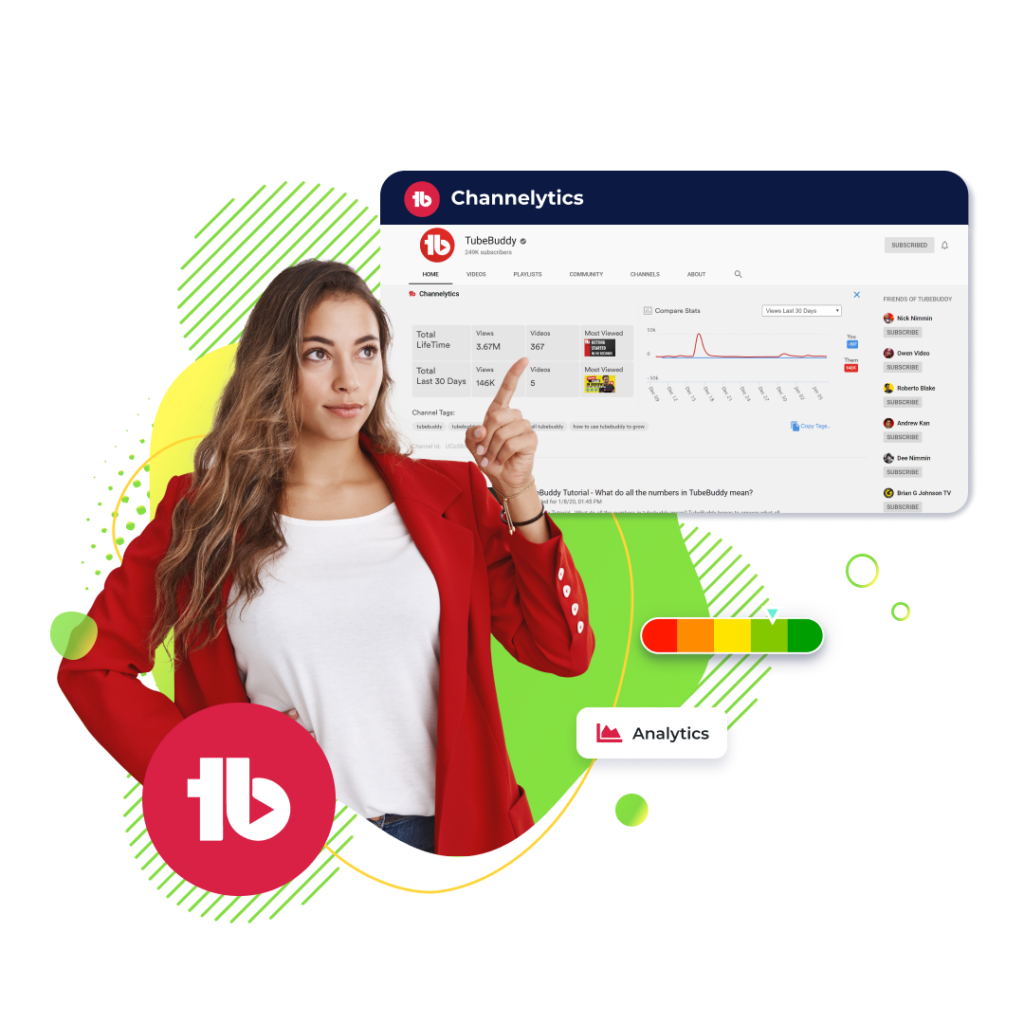
Standing out on YouTube means understanding what’s working for others in your niche. With Channelytics, you can perform in-depth YouTube competitor analysis and run accurate YouTube channel comparison without leaving YouTube.
Track views and subscriber growth to track YouTube competitors and uncover the strategies driving their recent success. See which content formats, upload patterns, and growth trends are helping them outperform.
Use this YouTube channel analytics tool alongside Click Magnet to identify CTR patterns and understand why your competitors’ videos attract more clicks and engagement.

Analyze Your Competitors with Channelytics
Make smarter decisions using a powerful YouTube channel analytics tool. TubeBuddy Channelytics helps you track YouTube competitors, monitor growth trends, and uncover clear YouTube performance insights that expose gaps in your content strategy.
Use these insights with Keyword Explorer and SEO Studio to turn competitor data into targeted optimizations.
Analyze your competitors with Channelytics
Here’s How Channelytics Works
Feature available on

Free
Pro
Legend
How to study your competitors on YouTube
Each step gives actionable insights using TubeBuddy Channelytics, helping you compare YouTube channels effortlessly and understand what drives their growth:
- Step 1: Visit any competitor's YouTube page give Channelytics a second to load competitor's data.
- Step 2: Compare your performance and learn what's working for them.
Checkout what other creators are saying

“Once it got my videos ranking #1 in search I was hooked.”
@KarlOftebro

“TubeBuddy is VITAL for any YouTuber who is serious about making their channel a lucrative side-hustle or full-time job!”
@DanieJay

“TubeBuddy is like having a YouTube expert on staff who will give you advice and direction whenever you need it.”
@KarinCarr
Frequently asked questions
Channelytics is TubeBuddy’s YouTube competitor analysis tool that helps you compare your channel’s performance against others. It shows real-time data directly on YouTube, making it easier to learn from top creators and improve your strategy.
Channelytics tracks key performance indicators like views, subscribers, and video uploads. It provides side-by-side data comparisons between your channel and competitors, helping you identify strengths and areas for growth.
You can monitor metrics such as total views, subscriber count, recent growth in the last 30 days, upload frequency, and even the tags used by competing channels. This gives you a complete performance overview.
By seeing what works for similar creators, like fast-growing videos or trending topics, you can fine-tune your own content strategy. Channelytics helps you replicate successful patterns while avoiding ineffective tactics.
Visit a competitor’s YouTube channel and let Channelytics load their data automatically. You’ll then be able to compare their 30-day growth, performance trends, and optimization strategies directly alongside your own.
Regular use is ideal. Checking weekly or bi-weekly helps you stay up-to-date on competitor activity and assess whether your own channel strategy is driving meaningful progress.
Yes. Channelytics provides current performance data while also showing changes over the last 30 days, giving you insight into both real-time shifts and recent trends.
It shows how competing channels grow and what kind of videos attract more views and subscribers. By analyzing their engagement patterns, you can better understand what your own audience may respond to.
Simply install TubeBuddy’s browser extension and visit any YouTube channel, including your own or a competitor’s. Channelytics will automatically appear and display relevant data for that channel.
By analyzing what’s driving growth for others, like successful content formats or posting frequency, you can identify trends you haven’t tried and apply those learnings to boost your own channel performance.
Focus on high-performing competitors in your niche, track their recent growth, and observe which content types are gaining traction. Use that data to plan your topics, titles, tags, and upload schedules.
Channelytics helps you understand what kinds of videos, tags, and formats are performing well in your niche. With that knowledge, you can create more targeted, timely content that aligns with viewer demand and proven trends.
A YouTube channel analytics tool allows you to track views, subscribers, and growth patterns so you can understand what strategies work for top creators.
You should track views, subscriber growth, engagement activity, and upload consistency using competitor YouTube analytics.
Yes. TubeBuddy Channelytics combines real-time tracking, easy comparisons, and direct in-dashboard insights without switching tools.
Weekly tracking is ideal for monitoring trends, while monthly reviews help evaluate long-term growth strategies.
Other ways TubeBuddy can help you become a full-time content creator
These related features will take your channel to the next level
Suggested
Shorts
Our advanced AI identifies the most engaging parts of your videos for YouTube Shorts.
- Identfy your contents best moments.
- Learn what your audience loves to see.
- Available in all plans
Click
Magnet
Access advanced analytics that show you how to get more people to click on your videos.
- Determine which videos perform best.
- Discover what is driving the highest CTR.
- Available in Legend and Enterprise
Thumbnail Analyzer
Create professional thumbnails using parts from your video all in one place.
- Edit and create your thumbnails all in one place.
- Quickly make thumbnails that win clicks.
- Available in all plans.



